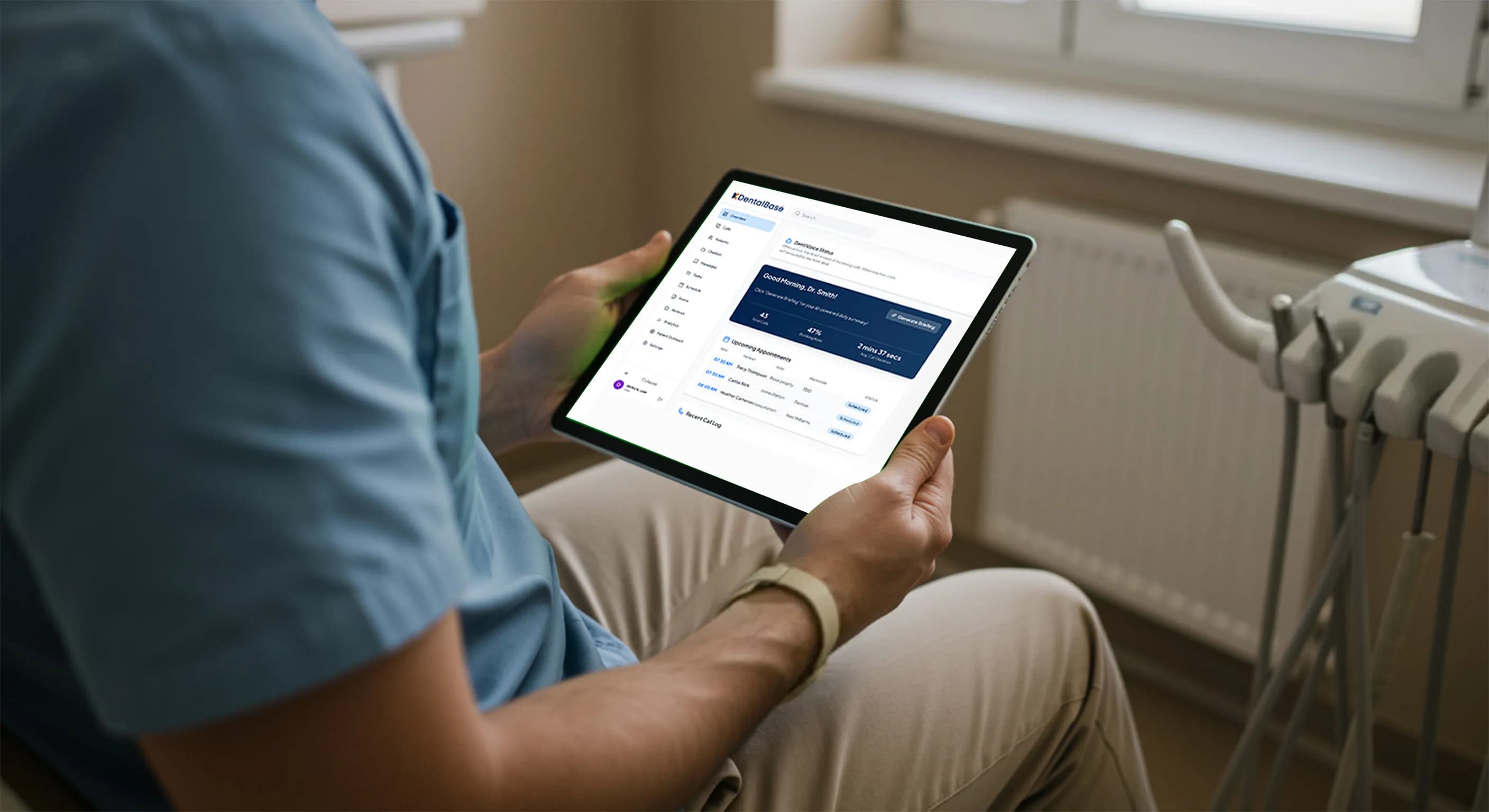
How to Implement an AI Receptionist in Your Dental Office

Learn how to implement an AI receptionist in your dental office, from choosing HIPAA-compliant software to training staff and tracking results.
Share:
Table of contents
If your team is fielding more calls than ever and still watching some go to voicemail, you're not alone: call volume at U.S. dental offices has climbed roughly 40% since 2020. This guide covers how to implement an AI receptionist in your dental office, from picking a platform to going live. Done well, it answers every call, books routine appointments around the clock, and frees your front-desk staff for the in-person work only they can do.
An AI receptionist typically handles 70-80% of routine calls on its own, and most practices complete setup in two to four weeks. Below, we walk through choosing a platform, integrating it with your systems, staying HIPAA compliant, and training your team so the rollout goes smoothly from week one.
Why Are Dental Offices Adopting AI Receptionists?
Dental practices are adopting AI receptionists because call volumes have climbed roughly 40% since 2020 while patients now expect immediate, 24/7 responses that traditional front-desk staffing cannot reliably deliver. The technology absorbs that overflow so practices stop losing new patients to missed calls.
The Rising Pressure on Front Desk Staff
The pressure on dental receptionists has intensified as practices compete for patient retention. 67% of potential patients will call a competitor if their initial call goes unanswered. Patient demand for dental care has also grown steadily, a trend the National Institute of Dental and Craniofacial Research has documented as access to care improves nationally. Hiring more front-desk staff to keep pace creates overhead many practices cannot sustain, and staffing shortages are a recurring theme in dental industry coverage right now.
| Front Desk Challenge | Impact on Practice | How AI Receptionists Help |
|---|---|---|
| High call volume | Missed calls, lost new patients | Answers multiple calls simultaneously |
| Limited office hours | After-hours inquiries go unanswered | Provides 24/7 availability |
| Staff multitasking | Errors, burnout, and long hold times | Automates routine tasks |
| Rising labor costs | Increased overhead | Scales without additional hires |
How AI Receptionists Support Your Team
This is where artificial intelligence enters the conversation, not as a replacement for your valued team members, but as a support technology. AI receptionists handle routine inquiries, basic scheduling, and after-hours communication. That frees your human staff for the complex, in-person work that requires real expertise. Practices comparing options often start with an AI dental receptionist pricing guide before choosing a platform.
What Is an AI Receptionist for Dental Offices?
An AI receptionist for dental practices is a specialized AI system that handles patient communications by phone, text, and web chat using natural language processing rather than pre-programmed menus. It understands patient intent and replies in dental-specific terms, not generic scripted responses.
Many practices adopt this technology to keep up with growing patient demand while still providing contextually appropriate responses tailored to dental terminology and common patient concerns.
Core Functions of a Dental AI Receptionist
These systems excel at core dental office functions: answering frequently asked questions about services, insurance coverage, and office hours; scheduling routine appointments and checkups; sending appointment reminders and follow-up messages; collecting basic patient information and updating contact details; and routing urgent calls to appropriate staff members or emergency protocols, all key reasons practices implement AI receptionist solutions.
How It Differs From Traditional IVR Systems
The key distinction from traditional IVR (Interactive Voice Response) systems lies in conversational ability. While IVR systems force patients through rigid menu options, AI receptionists can engage in natural dialogue, understanding requests like "I need to reschedule my cleaning next Tuesday" or "Does Dr. Smith accept my Delta Dental insurance?" This creates a more human-like experience while maintaining the efficiency benefits that drive practices to implement AI receptionist technology.
Critically, dental-specific AI receptionists are trained on dental terminology, common procedures, and typical patient workflows, making them far more effective than generic business AI solutions for healthcare environments and a compelling reason for dental practices to implement AI receptionist systems today. That dental-specific training is one of the first things to verify, and what to look for in dental AI receptionist software explains how to test it before you commit.
How Are AI Receptionists Used in Dental Clinics?
Dental clinics use AI receptionists to cover high-volume, repetitive tasks such as after-hours calls, appointment confirmations, and routine scheduling, while keeping clear rules for when a human team member must step in. The technology performs best in scenarios where consistency and constant availability matter most.
Typical use cases include managing the morning rush of confirmation calls, handling lunch-hour scheduling requests when staff are busy with patient care, responding to weekend and evening inquiries that would otherwise go unanswered, and conducting post-appointment follow-ups to gather feedback or schedule next visits. Some advanced systems can even perform basic insurance eligibility verification and collect patient intake information before appointments.
High-Value Front Desk Tasks AI Can Support
AI receptionists excel at repetitive, information-based tasks that don't require clinical judgment, including:
- Answering common questions about office policies, procedure costs, and insurance acceptance
- Scheduling routine cleanings, checkups, and follow-up appointments
- Sending automated reminders via text or voice calls
- Collecting and updating patient contact information and insurance details
- Providing directions, parking information, and office hour details
The system can handle multiple conversations simultaneously, ensuring no patient waits on hold during peak periods. For a closer look at how these systems behave day to day, see how practices operate an AI voice receptionist once it's live.
When to Escalate to Human Staff
Clear escalation protocols are essential for patient safety and satisfaction. AI systems should immediately transfer calls involving dental emergencies, pain complaints, or urgent symptoms to clinical staff. Complex scheduling requests involving multiple procedures, treatment plan discussions, or insurance pre-authorization questions require human expertise. Additionally, any patient expressing dissatisfaction, requesting to speak with a manager, or discussing sensitive financial matters should be promptly connected to appropriate human staff members. The goal is seamless handoffs that make patients feel heard and supported, a process covered in more detail in this staff handoff workflow guide.
| Task Type | AI Receptionist | Human Staff |
|---|---|---|
| Appointment scheduling | ✅ Routine & single-provider visits | ✅ Complex, multi-procedure cases |
| FAQs & office info | ✅ Instantly | ❌ Not needed |
| Insurance basics | ✅ General acceptance & benefits | ✅ Pre-authorizations & disputes |
| Emergency calls | ❌ Escalates immediately | ✅ Required |
| Emotional or sensitive conversations | ❌ Not appropriate | ✅ Essential |
How Do You Implement an AI Receptionist in Your Dental Office?
You implement an AI receptionist in your dental office in three phases: assess your call patterns and needs, choose and configure the right platform, then test scripts and escalation rules before go-live. Most practices complete this in two to four weeks, with monthly costs typically ranging from $50 to $500 depending on features and call volume.
The Three-Phase Rollout
- Assess practice needs and call volume. Track call patterns for 1-2 weeks, noting peak hours, common inquiry types, and missed call frequency. Document which tasks consume the most staff time and which patient interactions follow predictable patterns. Small practices might need basic appointment scheduling and FAQ responses, while larger clinics may require integration with multiple providers' schedules and complex insurance verification capabilities.
- Choose the right AI receptionist platform. Evaluate potential platforms based on dental-specific features, HIPAA compliance certifications, integration capabilities with your existing practice management software, and scalability options. Request demonstrations using scenarios specific to your practice type. Pricing models vary significantly, from per-minute usage to flat monthly fees, so align costs with your expected usage patterns. A step-by-step setup checklist can help you get operational in about a week.
- Configure scripts, rules, and handoffs. Work with the AI vendor to develop scripts that match your practice's tone and policies. Create decision trees for common scenarios: new patient inquiries, appointment changes, insurance questions, and emergency protocols. Test the configured system extensively using various patient scenarios before going live.
How Does an AI Receptionist Integrate With Your Systems?
An AI receptionist integrates with your systems through a cloud-based API connection to your existing phone lines and practice management software, so most practices need little to no new hardware. Call routing rules and backup protocols are configured during setup rather than built from scratch.
Phone System Integration
Phone system integration typically requires either a SIP (Session Initiation Protocol) connection for VoIP systems or direct integration with traditional phone lines through the AI provider's infrastructure. The setup process involves configuring call routing rules, establishing backup protocols for system failures, and testing call quality. Many platforms offer hybrid approaches where the AI handles initial interactions before transferring to your existing phone system when human assistance is needed.
Practice Management Software Integration
Practice management software integration enables the AI to access appointment schedules, patient contact information, and basic account details necessary for effective patient interactions. Common integrations include Dentrix, Eaglesoft, and Open Dental, among other popular dental software platforms. This connectivity allows real-time schedule checking, appointment booking, and patient information updates without manual data entry.
Additional Technical Considerations
Additional technical considerations include SMS and web chat integration for multi-channel patient communication, ensuring adequate internet bandwidth for reliable voice quality, and establishing backup communication methods during technical issues. Most reputable providers offer comprehensive technical support during setup and ongoing monitoring to maintain system reliability.
Is an AI Receptionist HIPAA Compliant for Dental Practices?
Yes, an AI receptionist can be HIPAA compliant when the vendor signs a Business Associate Agreement and applies proper safeguards for patient health information. Compliance failures carry real consequences beyond fines, including lost patient trust and legal liability.
HIPAA Requirements for AI Receptionists
Under HIPAA, AI receptionist providers are considered business associates, requiring signed Business Associate Agreements (BAAs) that outline specific responsibilities for protecting patient health information (PHI). The ADA's HIPAA compliance resources outline the core safeguards: encryption for data in transit and at rest, secure authentication, and audit logging of every patient interaction. Verify that your chosen platform maintains SOC 2 compliance and undergoes regular security audits, a topic covered in depth in this AI receptionist SOC 2 dental guide. The system should also purge call recordings and patient data on schedule and provide audit trails for compliance reporting.
Call recording adds another layer of complexity: eleven states require two-party consent before a call can be recorded at all, which is why it's worth reviewing call recording laws by state before enabling that feature.
Security Best Practices
Implement multi-layered security measures beyond basic HIPAA compliance. This includes regular staff training on AI protocols and privacy, clear access policies, network security like firewalls, and incident response procedures for potential data breaches. Document all security measures and review them regularly with your IT support team and legal counsel.
How Do You Train Staff to Work With an AI Receptionist?
Training staff to work with an AI receptionist means starting weeks before go-live. Focus on what the system handles, how it escalates, and why it supports rather than replaces their role. Address concerns directly instead of assuming buy-in will happen on its own.
What to Cover in Staff Training
Focus training on the AI system's capabilities and limitations, emphasizing how it handles routine tasks so staff can concentrate on complex patient interactions. Demonstrate the escalation protocols. Show staff how the AI transfers challenging calls to them with context and background information. Practice common scenarios where staff need to take over, so transitions stay smooth and don't frustrate patients. Many teams also train the assistant directly on practice-specific FAQs so its answers match office policy from day one. Staffing pressure remains a top concern across the industry, a trend ADA News covers regularly.
Managing the Transition
Address change management proactively. Explain how the AI receptionist supports rather than replaces human staff. Highlight benefits like fewer interruptions during patient care, fewer after-hours emergency calls for non-urgent matters, and more time for patient relationships. Some staff may resist the change at first, so acknowledge concerns while showing concrete benefits.
Ongoing Oversight
Establish clear protocols for monitoring AI interactions and updating responses based on feedback. Designate specific staff as system administrators who can adjust scripts and review performance. This creates ownership and ensures someone internally understands the system thoroughly.
How Do You Measure AI Receptionist Performance Over Time?
You measure AI receptionist performance by tracking call answer rates, successful scheduling rates, escalation frequency, and patient satisfaction against KPIs set before launch. Reviewing these numbers monthly is what turns a good initial setup into a system that keeps improving.
Metrics to Track
Track both quantitative metrics like average call duration, escalation rates to human staff, and missed call reduction, as well as qualitative feedback from patient surveys and staff observations. Monitor the AI's accuracy in handling different types of inquiries and identify areas where additional training or script refinement might improve performance. Ongoing call quality monitoring is what catches drift before it affects patients.
Continuous Optimization
Regularly review call recordings and transcripts to identify optimization opportunities. Common areas for improvement include updating FAQ responses based on evolving patient questions, refining appointment scheduling logic as your practice offerings change, and adjusting escalation triggers based on staff feedback and patient outcomes. Most AI platforms provide analytics dashboards that make performance tracking straightforward.
Vendor Check-Ins and ROI Reviews
Schedule monthly reviews with your AI vendor to discuss performance data, upcoming features, and potential system enhancements. Many practices also revisit their ROI and payback period at this stage to confirm the technology investment is still paying off as the practice grows and patient needs evolve.
Will an AI Receptionist Replace Your Front Desk Team?
No, a well-implemented AI receptionist is designed to support your front desk team, not replace it, by absorbing routine call volume so staff can focus on in-person care and complex patient needs. The technology works best as a force multiplier, not a substitute for human judgment.
Roll Out Gradually
Implement AI receptionist technology gradually, starting with after-hours coverage or handling overflow calls during peak periods. This approach allows staff to observe the benefits firsthand while maintaining their primary responsibilities. As comfort levels increase, expand AI responsibilities to include routine appointment confirmations, basic insurance inquiries, and follow-up communications. Throughout this process, emphasize how the technology enables staff to spend more quality time with in-office patients and handle complex situations requiring clinical knowledge.
Keep Your Team in the Loop
Successful implementation requires ongoing communication with your team about system performance, patient feedback, and workflow improvements. Regular staff meetings should include AI performance reviews, discussion of challenging cases that required human intervention, and suggestions for system optimization. This collaborative approach ensures staff feel valued as essential partners in delivering exceptional patient care.
Why the Human Touch Still Matters
Remember that patient relationships remain fundamentally human. While AI can efficiently handle routine interactions, your staff's expertise, empathy, and clinical judgment remain irreplaceable. The goal is to create a seamless experience where patients receive immediate assistance for simple needs while knowing that complex concerns will always reach caring, knowledgeable human staff members who understand their individual situations and treatment histories.
Ready to Evaluate an AI Receptionist for Your Practice?
Implementing an AI receptionist in your dental office comes down to picking a HIPAA-compliant platform, integrating it with your existing systems, and giving your team a clear runway to adjust. Practices that follow this order typically reach full rollout in two to four weeks and see ROI within 3-6 months through reduced missed calls and fewer after-hours staffing costs.
If your team is spending too much time reacting to missed calls instead of staying ahead of them, exploring DentiVoice can be a practical next step.
Request a DentiVoice demo to see how it would work in your practice.
Frequently Asked Questions
AI receptionist costs typically range from $50-500 per month depending on features and call volume. Initial setup may require $500-2000 for integration and customization. Most dental offices see ROI within 3-6 months through reduced staffing costs and increased appointment bookings.
Yes, when properly configured. Choose AI systems specifically designed for healthcare with end-to-end encryption, secure data storage, and signed Business Associate Agreements (BAAs). Ensure the provider meets HIPAA requirements and regularly audit compliance measures.
Modern AI receptionists can manage appointment scheduling, basic insurance verification, and treatment reminders. However, complex cases requiring clinical judgment or detailed insurance negotiations may still need human oversight. Most systems handle 70-80% of routine calls independently.
Implementation typically takes 2-4 weeks. This includes initial setup (3-5 days), system integration with practice management software (1-2 weeks), staff training (2-3 days), and testing phase (1 week). Larger practices may require additional time for customization.
AI receptionists are designed to augment, not replace human staff. They handle routine calls, allowing human receptionists to focus on complex patient needs, in-person interactions, and clinical support tasks. Most successful implementations use AI as a supportive tool alongside existing staff.
Sources & References
- 1
- 2
- 3
- 4
- 5
- 6
- 7
Was this article helpful?
Written by
DentalBase Team
Expert dental industry content from the DentalBase team. We provide insights on practice management, marketing, compliance, and growth strategies for dental professionals.